


Automation in the Nyverra Portal: rules that work for you
 Wedson Lopes
There is a silent productivity thief in every IT operation: repetitive tasks. Classifying, assigning, changing priority, notifying the manager — done by hand, hundreds of times per week. The Automation module of the Nyverra ITSM Portal exists to give that time back to the team.
This guide explains how rules work, what can be automated, how to track executions, and where the visual designer fits in.
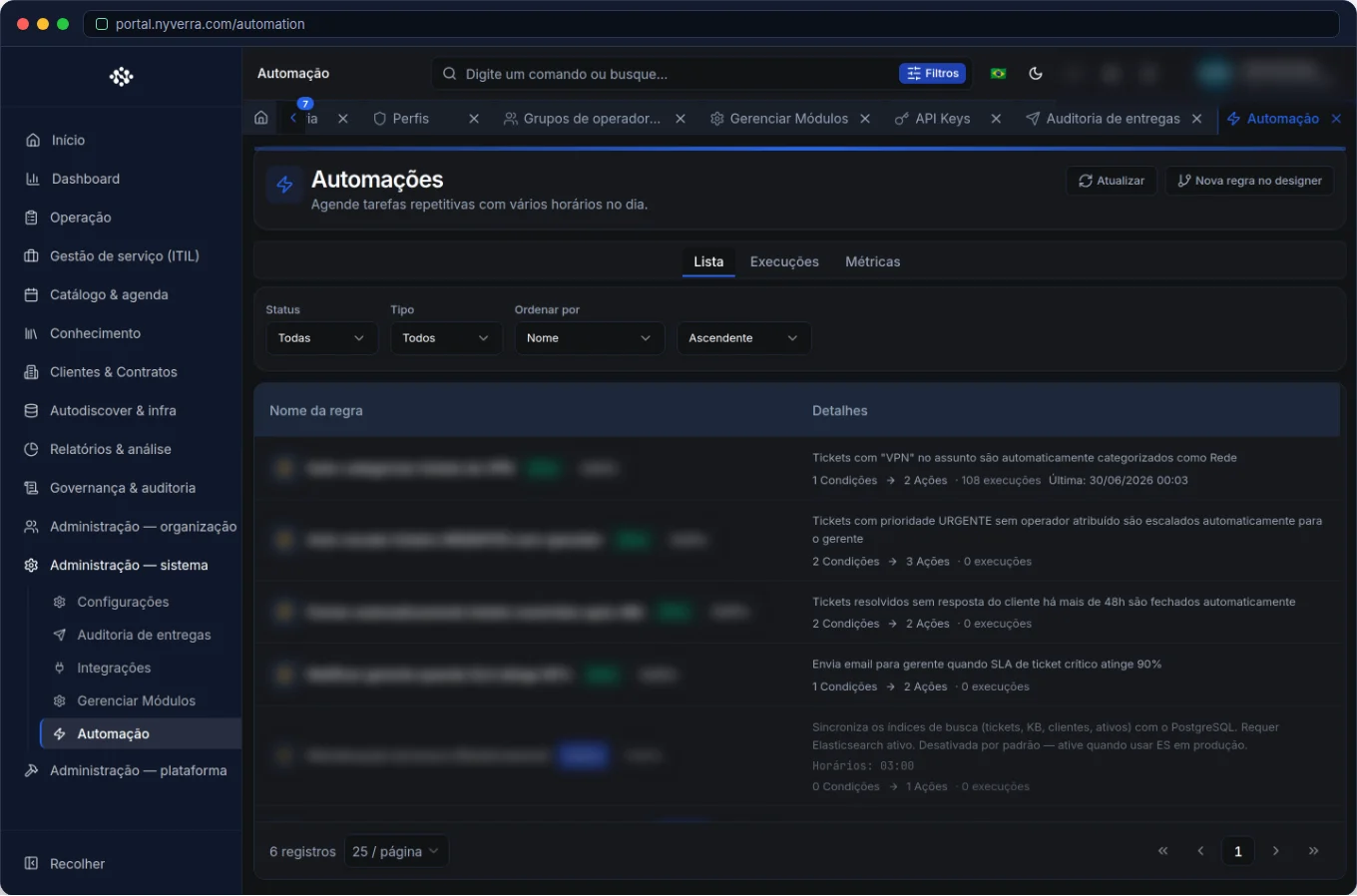 Module interface in the Nyverra ITSM Portal.
What is an automation rule
It is a condition → action instruction. The engine observes events in the Portal and, when the condition is met, executes one or more actions — without human intervention. It is the “if this, then that” applied to service.
| Condition (examples) | Action (examples) |
|---|---|
| Ticket created in the “Network” category | Assign to the Network group |
| Urgency “Critical” | Notify manager and apply priority SLA |
| Access request | Start approval flow |
| Status changed to “Pending” | Pause SLA and notify requester |
What can be automated
- Routing: forward by category, type, client, or urgency.
- Priority: define/adjust priority automatically.
- Notifications: notify the right people on each event.
- Flows: start approvals or standard tasks.
- Hygiene: follow-up rules and reminders.
Rule management
| Operation | What it does |
|---|---|
| Activate/deactivate | Turns a rule on/off without deleting it |
| Duplicate | Clones a rule as a basis for another |
| Delete | Removes the rule |
| Execution history | Shows when and how the rule triggered |
The execution history is what turns automation from a “black box” into a reliable tool: you see what the rule did and when.
Visual designer and dry-run
Simple rules fit on one line. For more elaborate flows, there is a visual designer (rule editor), useful for orchestrating multiple conditions and actions. And, whenever possible, it's ideal to test (dry-run / test with a real case) before leaving the rule active in production.
Who uses it
| Profile | Use |
|---|---|
| Administrator | Create, test, and maintain rules |
| Service manager | Define the policies that automation implements |
How to use: step by step
- Identify repetitive tasks (routing, priority, notifications).
- Create the rule (condition + actions).
- Test with a real case before activating.
- Activate and monitor the execution history.
- Adjust according to actual behavior.
Business rules and precautions
| Point | Explanation |
|---|---|
| Conflicts | Rules that compete with each other produce unexpected effects — keep them coherent. |
| Predictability | Name and document each rule; opaque automation is a risk. |
| Scope | Rules apply to the instance; review impact before activating. |
| Audit | The history allows investigating why something was (or wasn't) executed. |
Best practices
- Start with few high-impact rules (routing and priority).
- Name and document each rule — future administrators will thank you.
- Test before activating; monitor the first executions.
- Review rules that conflict or no longer trigger.
- Use the visual designer only when complexity justifies it.
Common mistakes
| Situation | What to do |
|---|---|
| Ticket routed incorrectly | Review the condition and conflicts between rules. |
| “Ghost” rule | Check execution history and state (active/inactive). |
| Opaque automation | Document it; without clarity, it becomes technical debt. |
Frequently asked questions
Does automation replace the operator?
No — it removes repetitive work and frees the team for tasks that require judgment.
Can I test before activating?
Yes, with test/dry-run when available.
How do I know what the rule did?
Through the execution history.
Automate via API
Rules are exposed via API (/api/automacao and execution logs). Reference at developer.nyverra.com.
Use scenarios: what to automate first
1. Automatic routing. A ticket with category “Network” goes directly to the Network group — without manual triage. It is the highest-impact automation, because it attacks the daily bottleneck of the service desk.
2. Priority and SLA. Urgency “Critical” applies priority SLA and notifies the manager. The rule ensures that the critical never ends up treated as routine.
3. Approval flow. Access request automatically starts approval steps, sparing the requester from “figuring out the process”.
4. Operational hygiene. Stalled tickets receive a reminder; status “waiting for client” pauses the SLA and notifies the requester.
Automation KPIs
| Indicator | What it reveals |
|---|---|
| Active rules | Automation level |
| Executions per period | Actual rule usage |
| Rules without execution | “Dead” automation |
| Conflicts/rule errors | Condition accuracy |
Automation with criteria
The biggest risk of automation is opacity: rules that act without anyone understanding why. Mitigate it with clear names, documentation, testing before activation, and monitoring of execution history. Start with few high-impact rules, measure the effect, and expand. Thus, automation reduces manual work without hiding what is happening under the hood — which is the only way for it to be reliable in the long run.
Automation checklist
- Identify repetitive tasks.
- Create high-impact rules first.
- Test before activating.
- Monitor execution history.
- Review conflicts between rules.
- Document each rule.
Additional frequently asked questions
Does automation replace the operator?
No; it removes repetitive work and frees the team.
How to know why something was routed?
Through the execution history of the rules.
Can I turn off a rule without deleting it?
Yes, using activate/deactivate.
Conclusion
With Automation, the Nyverra ITSM Portal works 24/7 routing, prioritizing, and communicating. Done with criteria — clear, tested, and monitored rules — it reduces manual labor and lets the team focus on what really needs people.
Leia também: Business Services in Nyverra Portal: Translating IT into Business · Agent Reports in Nyverra Portal: Reports on Autopilot.
Keep reading
Read also
 Portal ITSM
Business Services in Nyverra Portal: Translating IT into Business
The business doesn't feel a server go down — it feels email stop. The Business Services (Service Mapping) module of Nyverra ITSM Portal connects services like Email, ERP or PACS to CMDB assets, revealing the real impact of each failure.
5 min de leitura Portal ITSM
Agent Reports in Nyverra Portal: Reports on Autopilot
Generating, assembling, and distributing reports manually is exhausting. The Agent Reports module in the Nyverra ITSM Portal triggers playbooks, reruns reports on demand, and maintains a history of each execution — information without manual work.
4 min de leitura Portal ITSM
Problem Management in Nyverra Portal: RCA, Problem Groups, and KEDB
Instability is not solved by firefighting. The Problems module of Nyverra ITSM Portal investigates the root cause of recurring incidents, documents workarounds, and feeds the Known Error Database (KEDB) — with multidisciplinary groups, RCA, and impact analysis.
7 min de leitura
Comments
No comments yet
Be the first to share your thoughts on this article.
Leave a comment