


Client Management in Nyverra Portal: Multi-Tenant Without Mixing Data
 Wedson Lopes
In an IT service provider (MSP), nothing is more dangerous than mixing data between clients. Serving client A cannot, under any circumstances, expose information from client B. The Clients module of the Nyverra ITSM Portal is the foundation of this isolation — and the starting point for SLAs, contracts, and reports.
This guide covers client registration, the multi-tenant model, visibility scope by profile, and the links that provide context to support.
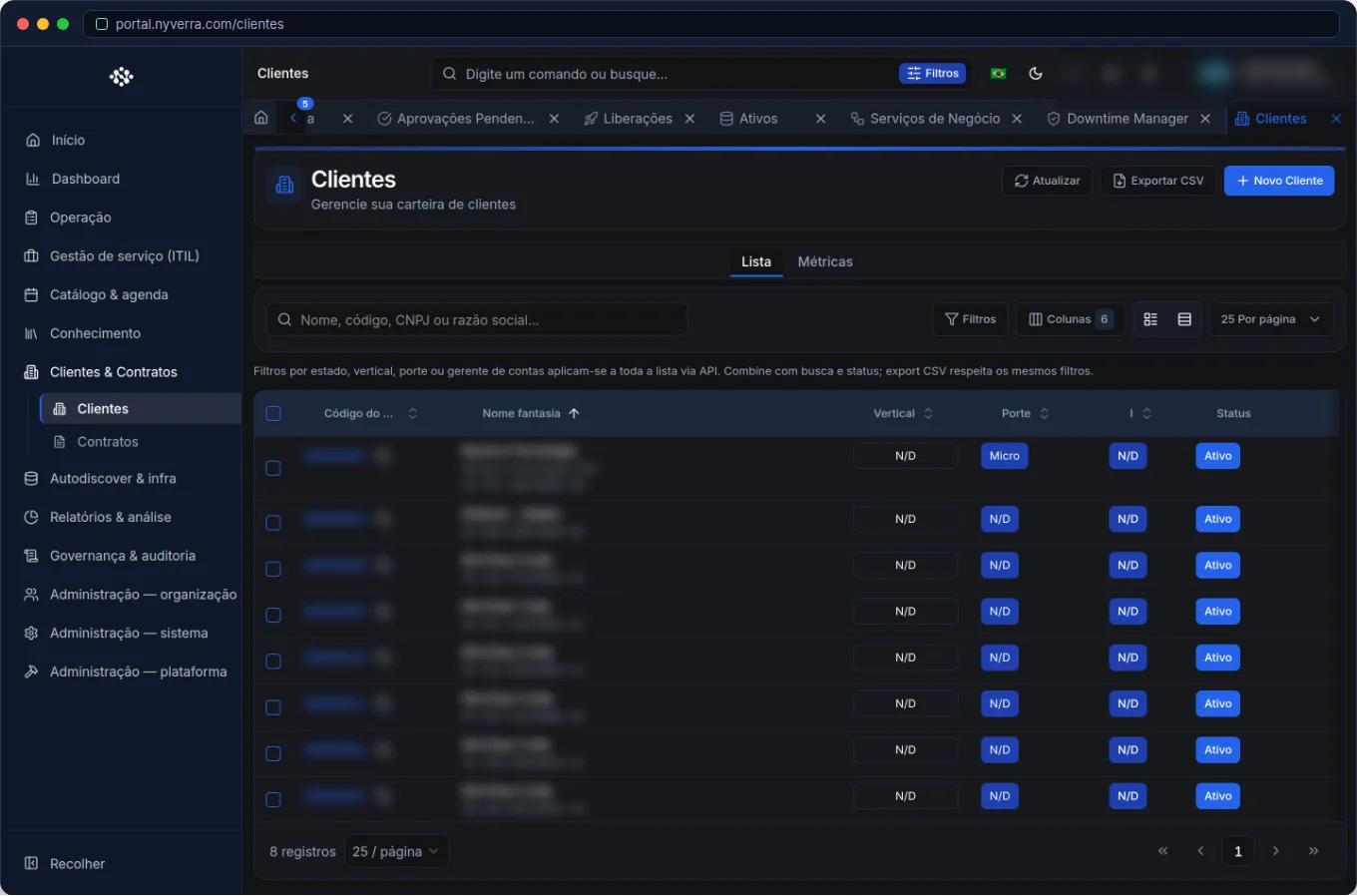 Module interface in the Nyverra ITSM Portal.
The Client as the Core of the System
Practically everything in the Portal revolves around the client: tickets, assets, contracts, contacts, reports. Therefore, a well-done registration is not bureaucracy — it is what ensures that the system knows who it is serving and under what rules.
| Area | Relationship with the client |
|---|---|
| Tickets | Inherits client, rules, and SLA from scope |
| Assets (CMDB) | Belong to a client |
| Contracts | Define SLA and hour pool for the client |
| Contacts | Are the people of the organization |
| Reports | Segment by client |
Multi-Tenant and Visibility Scope
The architecture is multi-tenant: one instance serves multiple organizations, each isolated. Visibility depends on the profile:
| Profile | Reach |
|---|---|
| Client user | Sees only data from their organization |
Technician with VIEW_OWN |
Sees the clients to which they are linked |
Technician/admin with VIEW_ALL |
Sees all clients |
It is this separation that allows an MSP to operate dozens of clients in the same tool without risk of leakage between them.
What the Client Registration Stores
- Identification: legal name, trade name, and document.
- Contacts: reference persons (integrated with the Agenda).
- Links: contracts, assets, and business services.
- History: tickets and indicators per client.
- Infrastructure map: in detail, the infra tab shows the CMDB map of that organization.
Who Uses It
| Profile | Use |
|---|---|
| Admin / backoffice | Registration of clients, contacts, and links |
| Technician | Context query when serving |
| Client | Does not access other clients' registration |
How to Use: Step by Step
- Register the client with complete data and document.
- Add contacts and define the main communication point.
- Link contracts (SLA, term) and assets (CMDB).
- Assign accesses: users (who log in) and technician links.
- Use the client as a filter in tickets, reports, and queues.
Business Rules
| Rule | Explanation |
|---|---|
| Mandatory scope | Tickets and assets respect the client — avoids mixing data between companies. |
| MSP | Operators serve multiple clients according to VIEW_ALL vs VIEW_OWN. |
| Contract | Expired contract may affect commercial rules — follow internal policy beyond the system. |
| Privacy | Client and contact data are PII — handle according to LGPD. |
Best Practices
- Standardize the naming of organizations (avoids duplication and facilitates reporting).
- Keep documents and contact data up to date.
- Define the main contact for each client — speeds up communication in incidents.
- Link contracts and assets at creation, not "later".
- Use client filters in reports for a specific view of each account.
Common Mistakes
| Situation | What to do |
|---|---|
| Duplicate client | Search by document/legal name before creating. |
| Asset without client | Link to ensure scope and impact analysis. |
| User with wrong scope | Review the link and permissions in the Users module. |
Frequently Asked Questions
Is a client the same as a contact?
No. The client is the organization; contacts are people of that organization.
Can a technician serve multiple clients?
Yes, according to permissions (VIEW_ALL) and links.
Does a client see other clients' data?
No — multi-tenant isolation prevents it.
Automate via API
Clients are exposed via API (/api/clientes), allowing synchronization of the registration with CRM/ERP. Reference at developer.nyverra.com.
Use Cases: The Client as the Core
1. MSP with dozens of accounts. The technician serves multiple clients in the same instance. The per-client scope ensures they see only the linked accounts — and that data from one client never appears in another's service. This is what makes the multi-tenant model secure in practice.
2. Onboarding a new client. The organization, its contacts, the contract (with SLA), and the initial assets are registered. From then on, that client's tickets already inherit the correct rules — without case-by-case configuration.
3. Context in the incident. When opening the ticket, the technician sees that client's history, assets, and current contract, making more informed decisions in less time.
KPIs and Registration Governance
| Indicator | What it reveals |
|---|---|
| Active vs inactive clients | Real operating base |
| Clients without linked contract | Commercial risk |
| Clients without contacts | Compromised communication |
| Detected duplications | Registration quality |
Integration with the Rest
Client registration does not live in isolation: it feeds contracts (SLA and hour pool), CMDB (assets), reports (segmentation), and the Client Portal. In organizations with CRM/ERP, synchronizing the registration via API (/api/clientes) avoids rework and data divergence. The rule is clear: a well-done registration saves support hours and avoids costly errors.
Client Registration Checklist
- Search for duplication by document/legal name.
- Standardize the naming of organizations.
- Add contacts and define the main one.
- Link contracts and assets.
- Configure the access scope of client users.
- Review inactive clients periodically.
Additional Frequently Asked Questions
How does the client access the portal?
With a user linked to the organization; they see only their own data.
What happens if the client has no contacts?
Communication becomes compromised; keep at least one active main contact.
Can I have multiple units of the same client?
Yes, using locations/branches linked to the organization.
Conclusion
A consistent client registration is the foundation of SLA, contracts, and service intelligence. With multi-tenant isolation and profile-based scope, the Nyverra ITSM Portal allows operating many clients in a single instance — with security and organization.
Leia também: Reports in the Nyverra Portal: Evidence to Decide and Prove · Dashboard on the Nyverra Portal: KPIs the Operation Needs to See.
Keep reading
Read also
 Portal ITSM
Reports in the Nyverra Portal: Evidence to Decide and Prove
Indicators that don't lead to action are just numbers. See how the Nyverra ITSM Portal generates executive reports, client and contract extracts, hours per technician, email scheduling, and history — the evidence that management and compliance demand.
5 min de leitura Portal ITSM
Dashboard on the Nyverra Portal: KPIs the Operation Needs to See
Managing without measuring is guessing. The Nyverra ITSM Portal Dashboard brings together service KPIs, trend, distributions, and SLA/OLA breaches in a single view — with kiosk mode for big screens and profile-configurable layout.
5 min de leitura Portal ITSM
Contracts and Hour Pool in Nyverra Portal: SLA and consumption under control
The contract defines the service level and hour consumption. See how Nyverra Portal ITSM manages validity, SLA, and hour pool per client — with statements and reports that provide predictability to service delivery and sales.
5 min de leitura
Comments
No comments yet
Be the first to share your thoughts on this article.
Leave a comment