


Reports in the Nyverra Portal: Evidence to Decide and Prove
 Wedson Lopes
There is a gap between having data and having information. The Nyverra ITSM Portal reports exist to bridge this gap: transforming the service history into decision, accountability, and compliance.
This guide covers executive reports, client and contract extracts, hour indicators, email scheduling, and execution history.
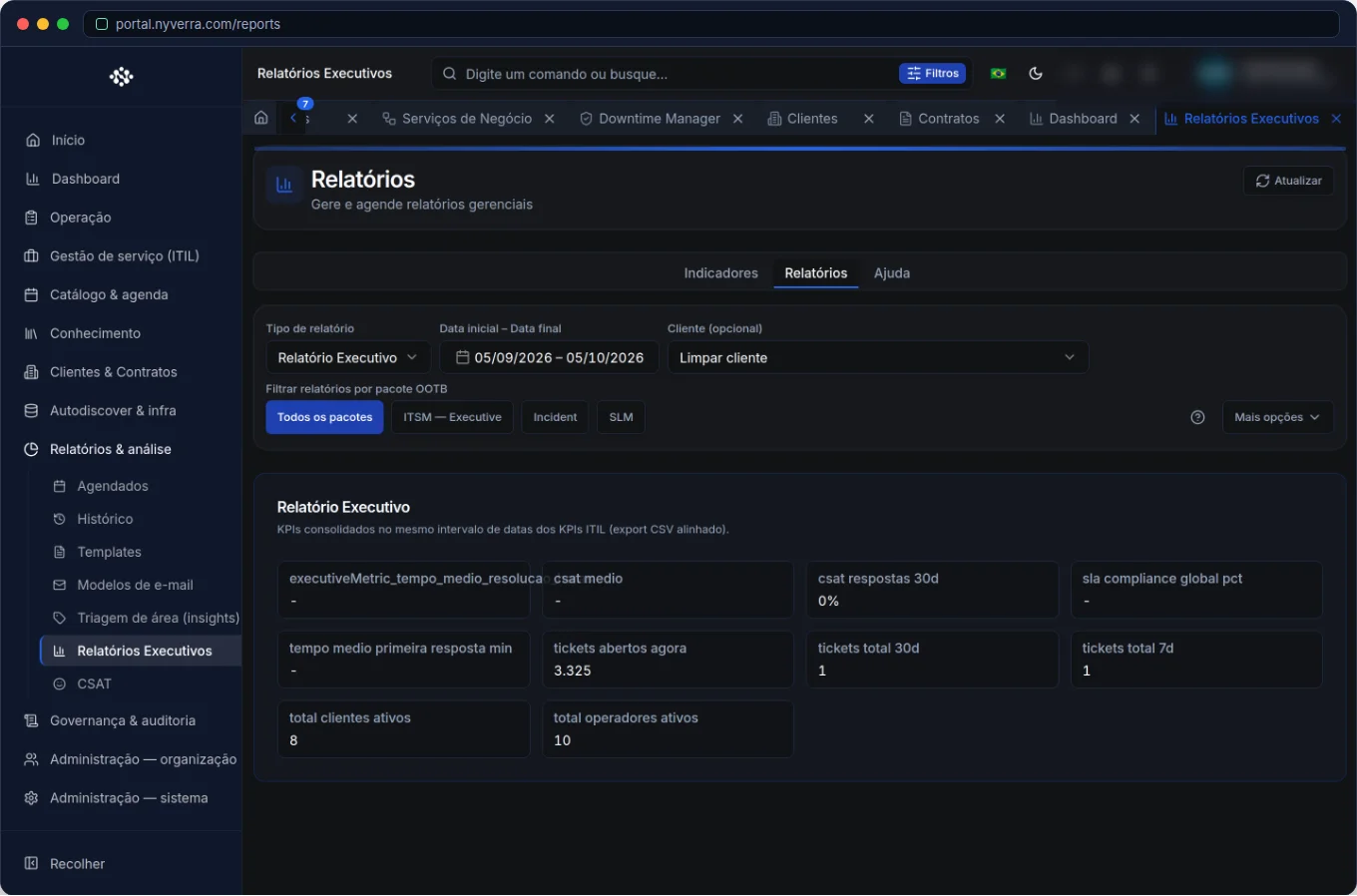 Module interface in the Nyverra ITSM Portal.
What reports are for
Unlike the Dashboard (which shows the “now”), reports look at the period and answer management and client questions:
- “What is the SLA compliance for the last quarter?”
- “How many hours have we consumed from client X's contract?”
- “Which technician handled the most tickets this month?”
- “I need to prove actions for ISO 20000 audit.”
Key reports
| Report | Answers |
|---|---|
| ITIL and change KPIs | Performance of ITIL disciplines |
| Client extract | What was done for the organization in the period |
| Contract extract | Hour consumption and contractual scope (with PDF) |
| Hours per technician / per client | Productivity and effort allocation |
| Distributions | Volume by status, category, priority |
Scheduled reports: information on autopilot
A report is only useful if it arrives at the right time. The scheduled reports module sends reports by email according to defined periodicity and recipients:
- Create the schedule by choosing the template and frequency.
- Define the recipients.
- Use “test send” before activating.
- Activate the schedule — and track it in the history.
The report history stores executions and allows downloading the generated artifact (for example, the extract PDF), ensuring that evidence remains recoverable.
Who uses it
| Profile | Typical use |
|---|---|
| Manager | Executive and performance reports |
| Admin / backoffice | Templates, schedules, and history |
| Commercial | Extracts for renewal and billing |
How to use: step by step
- Open Reports or the Dashboard.
- Filter by period and, when applicable, by client/contract.
- Export (PDF/Excel) when the button exists.
- For recurrence, create a schedule and test the send.
- Check the history to retrieve past artifacts.
Business rules
| Rule | Explanation |
|---|---|
| Permission | Executive reports may require specific permissions beyond the menu. |
| Data | They reflect the database at the time of execution; scheduled ones run at server time (timezone in Settings → System). |
| Export | May require export permission and, in some cases, a selected client. |
Best practices
- Standardize categories — comparable reports depend on consistent classification.
- Generate periodic extracts for the client: transparency retains accounts.
- Combine SLA + hours to negotiate contracts with data, not guesswork.
- Schedule management reports (weekly/monthly) to avoid relying on manual generation.
- Keep the history as evidence of compliance.
Common mistakes
| Situation | What to do |
|---|---|
| “Strange” numbers | Check the period, timezone, and ticket classification. |
| Scheduled report does not arrive | Test SMTP and review recipients; check the delivery audit. |
| Extract without hours | Confirm if there is time log in the tickets. |
Frequently asked questions
Are Report and Dashboard the same thing?
No. Dashboard = real time; report = period + evidence/export.
Can I send an automatic report by email?
Yes, through scheduled reports, with send test.
Can I recover a past report?
Yes, through the report history (with download).
Automate via API
Reports are exposed via API (/api/reports, /api/relatorios incl. extracts, /api/relatorios-agendados and /api/relatorios-historico/{id}/download). Reference at developer.nyverra.com.
Use cases: reports that drive decisions
1. Monthly extract to the client. At the end of the month, the client receives a report with handled tickets, met SLA, and consumed hours. Transparency sustains the relationship and reduces reactive billing.
2. Audit evidence. An ISO 20000 certification or an LGPD audit requires evidence. The report history stores the generated artifacts, with date and content — ready to present.
3. Data-driven negotiation. The manager takes the hours per technician and per client report to capacity and contract meetings, defending investments with numbers.
KPIs and report best practices
| Practice | Benefit |
|---|---|
| Schedule recurring sends | Information arrives without depending on someone generating it |
| Test the send before activating | Avoids reports that “don't arrive” |
| Standardize categories | Comparability between periods |
| Keep the history | Compliance evidence |
| Filter by client/contract | Specific and actionable view |
Distribution automation
Combine scheduled reports (distribution) with the Reports Agent (generation). The agent triggers playbooks and records each execution; the schedule ensures the result reaches recipients. The effect is direct: less time assembling reports, more time using what they reveal — and a continuous improvement cycle that does not depend on manual heroics.
Reports checklist
- Standardize categories before reporting.
- Define routine reports (weekly/monthly).
- Create schedules and test the send.
- Configure extracts by client/contract.
- Keep the history as evidence.
- Use the numbers for action plans.
Additional frequently asked questions
How do I avoid reports with “wrong” numbers?
Check period, timezone, and ticket classification before concluding.
Can I send to the client automatically?
Yes, with scheduled reports and defined recipients.
Where are generated reports stored?
In the history, with download when needed.
Conclusion
With reports, the Nyverra ITSM Portal closes the continuous improvement cycle: measure, decide, and prove. Whether for management, for the client, or for the audit, evidence is one click away — and can arrive on its own to the inbox.
Keep reading
Read also
 Portal ITSM
Contracts and Hour Pool in Nyverra Portal: SLA and consumption under control
The contract defines the service level and hour consumption. See how Nyverra Portal ITSM manages validity, SLA, and hour pool per client — with statements and reports that provide predictability to service delivery and sales.
5 min de leitura Portal ITSM
Roles and Permissions in Nyverra Portal: Tailored Access Control
RBAC is the foundation of access control. See how the Roles module in Nyverra Portal ITSM defines granular profiles and permissions, protects sensitive functions with 2FA, enables temporary delegation by period, and relies on the principle of least privilege.
5 min de leitura Portal ITSM
Traceability in Nyverra Portal: The Complete History of Every Ticket
Audit + history in a single timeline. The Traceability module of Nyverra Portal ITSM reconstructs the lifecycle of a ticket — who did what, when, and in what order — for investigation, root cause, and compliance (ISO 20000, LGPD).
5 min de leitura
Comments
No comments yet
Be the first to share your thoughts on this article.
Leave a comment