


Roles and Permissions in Nyverra Portal: Tailored Access Control
 Wedson Lopes
There is a question every corporate system must answer precisely: who can do what? Answering “it depends” is not acceptable. The Roles module in Nyverra Portal ITSM implements RBAC (role-based access control) to give each person exactly the permissions they need — no more, no less.
This guide explains how roles, permissions, per-client scope, protection of sensitive functions with 2FA, and temporary delegation work.
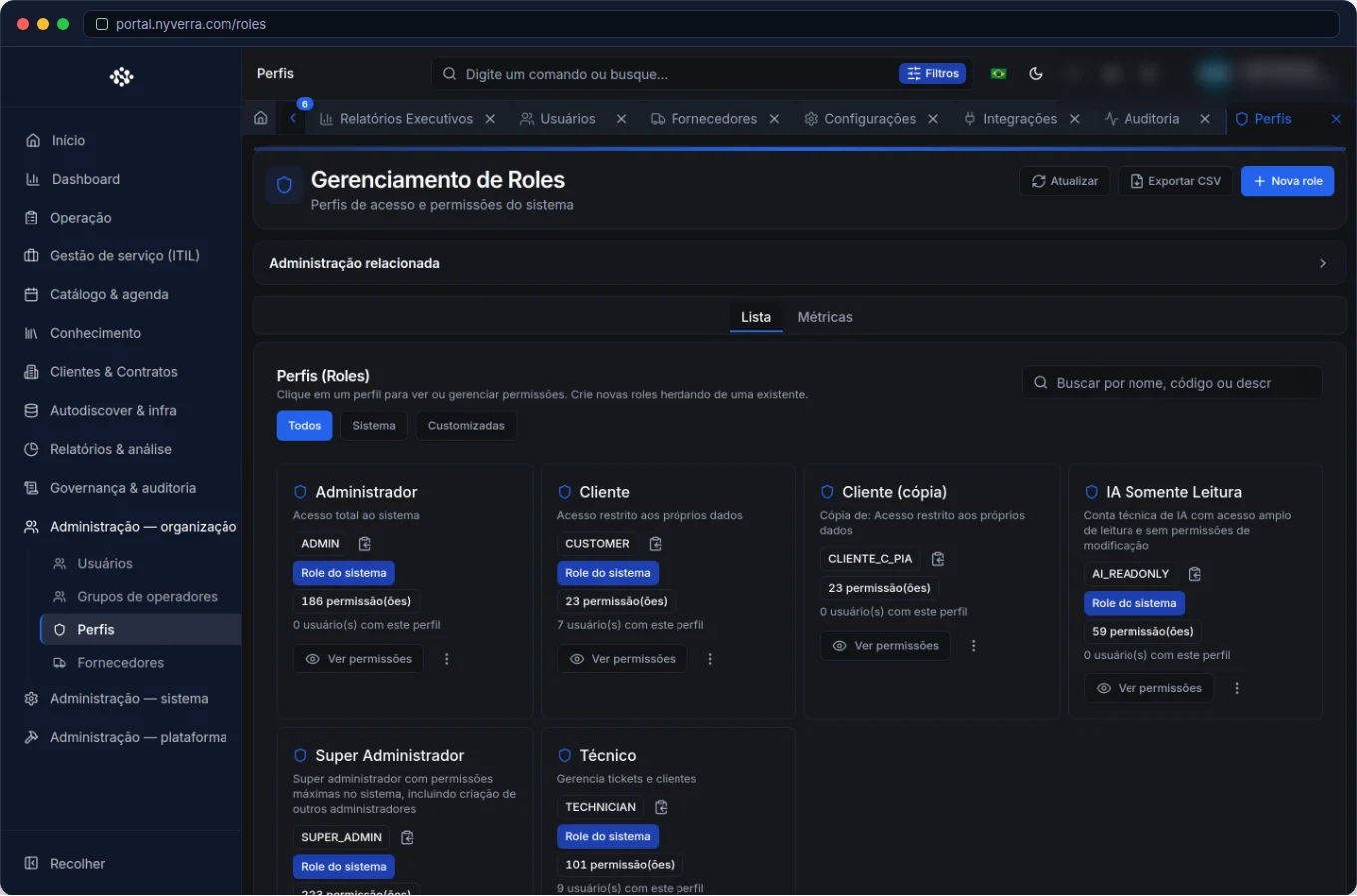 Module interface in Nyverra Portal ITSM.
Roles, permissions, and users
The model has three layers:
| Layer | What it is |
|---|---|
| Permission | The specific action (e.g., TICKET_VIEW_ALL, TICKET_UPDATE_ALL, CONFIG_VIEW) |
| Role | A set of permissions grouped by function |
| User | Receives one or more roles, and the Portal grants resources according to the resulting permissions |
This design avoids granting permissions “loosely” to each person: you model the function once and assign the role.
Granular permissions
Permissions are specific by resource and action, allowing separation between viewing and changing, and between “own” and “global” scope. Everyday examples:
TICKET_VIEW_OWN/TICKET_VIEW_ASSIGNED/TICKET_VIEW_ALL— what the user sees.TICKET_UPDATE_OWN/..._ASSIGNED/..._ALL— what they change.TICKET_DELETE,CONFIG_VIEW,MODULE_MANAGE,RELEASE_*,CHANGE_*— sensitive operations.
It is this granularity that makes the module serve both a client (who sees only their own scope) and a global administrator.
Scope by client
In addition to permissions, many accesses are limited by client: a technician can be VIEW_ALL on one client and VIEW_OWN on another (or via context delegation). In MSPs, this is what prevents a technician from accessing data from an account that is not theirs.
Sensitive functions and 2FA
Permissions that change global settings, manage users, or approve changes should not be behind a simple password. The Portal allows requiring 2FA (second factor) for sensitive roles, strengthening protection exactly where the impact of unauthorized access is greatest.
Temporary delegation
What if the approver goes on vacation? Instead of granting permission “forever”, the module enables delegation with an end date: the user receives the permissions for a period and they expire automatically. It's access control with an expiration date — much safer than forgetting to revoke manually.
Who uses it
| Profile | Use |
|---|---|
| Administrator | Create/edit roles and assign them to users |
| Super administrator | Privileged accounts and profile elevation |
| Manager | Request/grant delegations by period |
How to use: step by step
- Map the functions of the operation (N1, N2, manager, admin, client).
- Create roles with the minimum set of permissions.
- Assign roles to users.
- Protect sensitive functions with 2FA.
- Grant temporary delegations with an end date when necessary.
- Review roles and assignments periodically.
Business rules
| Rule | Explanation |
|---|---|
| Least privilege | Grant only what is necessary for the function. |
| Super admin | Only this profile can promote administrators or edit privileged accounts. |
| Delegation | Temporary permissions require justification and an end date. |
| 2FA | May be mandatory for sensitive roles. |
Best practices
- Apply the least privilege by default.
- Avoid “do-it-all” roles: prefer focused roles.
- Prefer temporary delegation over granting permanent permission.
- Require 2FA for high-impact functions.
- Review permissions at every role change or offboarding.
Common mistakes
| Situation | What to do |
|---|---|
| User “doesn't see” something | Check role, permission, and client scope. |
| Accumulated privileges | Review assignments; remove what is no longer necessary. |
| Forgotten delegation | Use an end date; review active delegations. |
Frequently asked questions
What is the difference between role and permission?
A permission is the action; a role is the set of permissions assigned to people.
Can I grant temporary access?
Yes, through delegation with an end date.
Do roles replace operator groups?
No. Roles define what one can do; groups define the queue for service.
Automate via API
Roles and permissions are exposed via API (/api/roles, /api/permissoes, /api/rbac), with support for delegation. Reference at developer.nyverra.com.
Use cases: RBAC in practice
1. Client technician. Receives a role that allows viewing and updating only tickets in their scope (VIEW_OWN/UPDATE_OWN). Does not see data from other organizations — isolation by scope.
2. Queue manager. Their role includes VIEW_ALL and UPDATE_ASSIGNED, allowing managing the group queue without accessing global settings.
3. Administrator with 2FA. The administrative role requires a second factor, because it changes settings that affect the entire instance.
4. Approver vacation. A temporary delegation with an end date is granted — the substitute approver decides for a period, and the permission expires automatically.
KPIs and access governance
| Indicator | What it reveals |
|---|---|
| Roles created vs users per role | Simplicity of the model |
| Roles with “do-it-all” permissions | Risk of excessive privilege |
| Active delegations | Coverage control |
| Users with 2FA on sensitive roles | Security posture |
Least privilege: theory and practice
The principle is simple and hard to maintain: each person with the minimum necessary. In practice, it requires periodic review — functions change, people change, privileges accumulate. Nyverra Portal RBAC combines granular permissions, scope by client, 2FA on critical functions, and delegation with a deadline. Together, these features make access control both secure and manageable — what separates “paper” RBAC from RBAC that works.
RBAC checklist
- Map the operation's functions.
- Create roles with minimal permissions.
- Associate users with the correct roles.
- Require 2FA on sensitive functions.
- Configure delegations with an end date.
- Review permissions periodically.
Additional frequently asked questions
Are role and group the same thing?
No: role = permissions; group = service queue.
How to grant temporary access?
Through delegation with an end date.
Can a user have more than one role?
Yes, and the resulting permissions add up.
Conclusion
With Roles, Nyverra Portal ITSM provides fine-grained access control and strengthens security and compliance. Clear roles, granular permissions, 2FA on sensitive functions, and delegation with a deadline make RBAC truly work — on paper and in practice.
Keep reading
Read also
 Portal ITSM
Reports in the Nyverra Portal: Evidence to Decide and Prove
Indicators that don't lead to action are just numbers. See how the Nyverra ITSM Portal generates executive reports, client and contract extracts, hours per technician, email scheduling, and history — the evidence that management and compliance demand.
5 min de leitura Portal ITSM
Traceability in Nyverra Portal: The Complete History of Every Ticket
Audit + history in a single timeline. The Traceability module of Nyverra Portal ITSM reconstructs the lifecycle of a ticket — who did what, when, and in what order — for investigation, root cause, and compliance (ISO 20000, LGPD).
5 min de leitura Portal ITSM
Nyverra Portal Releases: Packaging Changes with Traceability
A release isn't just “pushing code”: it's grouping the changes that go live together in the same window, with order, status, and deployment records. See how the Releases module of the Nyverra ITSM Portal controls the REL-* cycle from planning to go-live.
6 min de leitura
Comments
No comments yet
Be the first to share your thoughts on this article.
Leave a comment