


Knowledge Base in the Nyverra Portal: Internal Articles and Public KB
 Wedson Lopes
Every support team has, hidden in the minds of a few, the knowledge that resolves 80% of tickets. The Knowledge Base exists to take that knowledge out of individual memory and make it available to everyone — operators and customers.
In this guide, you’ll understand how the KB in the Nyverra ITSM Portal works: the difference between internal articles and the public base, the category structure, search with filters (facets) and title suggestion, the feedback cycle, and the quality indicators that show what to review.
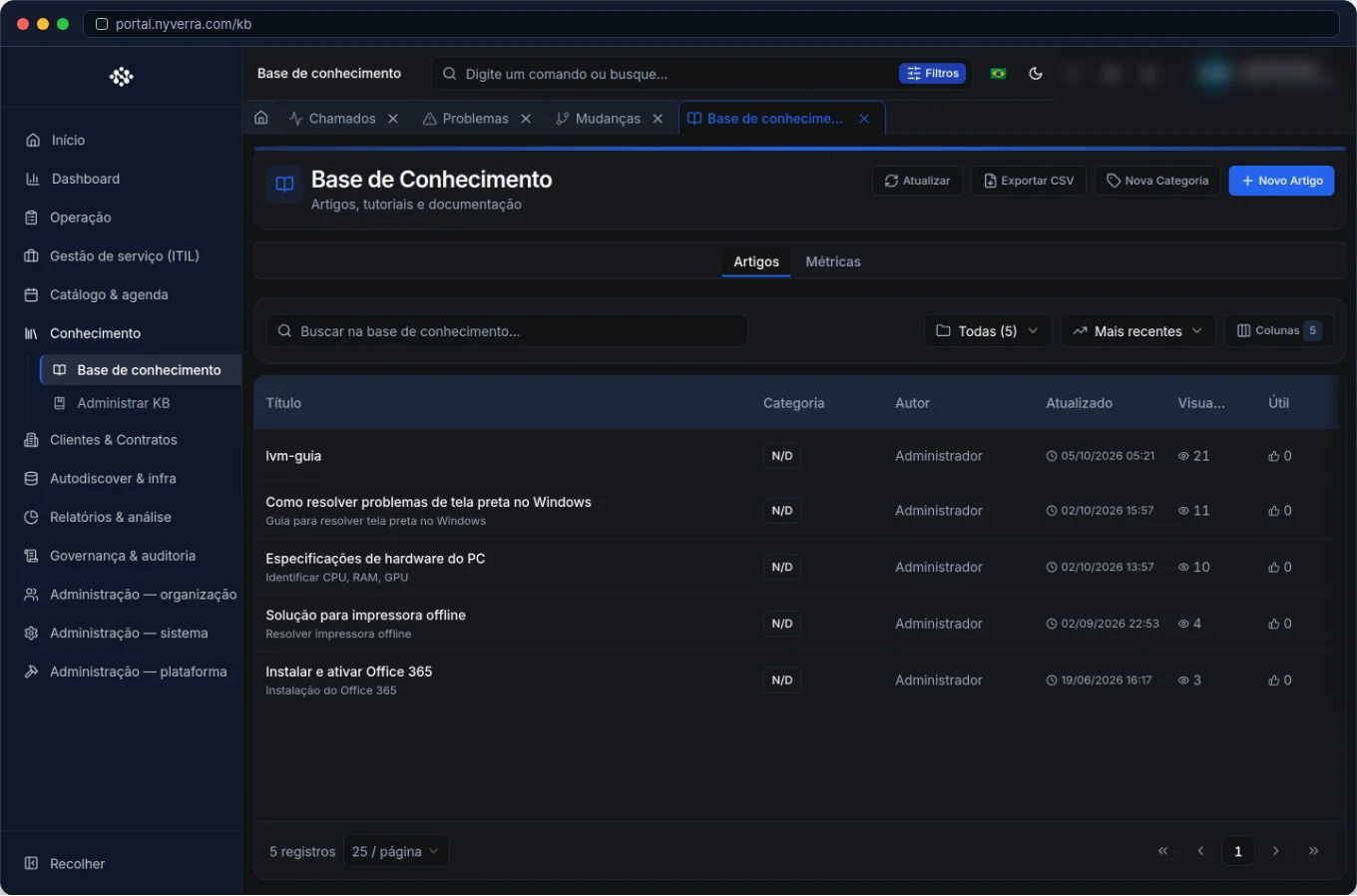 Module interface in the Nyverra ITSM Portal.
Why KB: the effect on metrics
A well-maintained base produces three measurable effects on the service desk:
- First-contact resolution: the technician responds quickly by consulting the correct procedure.
- Deflection: the customer resolves the issue themselves in the public KB and never opens a ticket.
- Standardization: everyone follows the same solution, reducing variation and error.
The opposite is also true: an outdated KB drives users away and becomes a cost. That’s why the module is not just “publishing articles”—it’s managing knowledge.
Two bases in one
The Portal separates two audiences in the same article system:
| Base | Who accesses | Purpose |
|---|---|---|
| Internal KB | Authenticated team (KB_VIEW permission) |
Operational procedures, runbooks, technical context |
| Public KB | Visitor, no login | Customer self-service (step-by-step, “how do I do X”) |
The same collection feeds both: an article marked as public appears to the visitor; the others remain restricted to the team.
Who uses it
| Profile | Use |
|---|---|
| Any authenticated user | Consult internal KB |
| Editor / administrator | Create categories and articles in Manage KB |
| Visitor | Consult public KB (no login) |
Module features
Categories and articles
Articles are organized by categories (e.g., Network, Email, Systems, Access). Articles are rich text, with images, lists, tables, and code snippets. A well-structured article has an objective title, brief context, and the solution in steps — one topic per article.
Faceted search with title suggestion
Search goes beyond free text: it offers facets (filters by category and tags), relevance sorting, and a title suggestion as the user types. This reduces the frustration of “I couldn’t find anything” — a major cause of avoidable tickets.
Reader feedback
Each article can receive a “useful / not useful” rating and comments. The team responds to feedback via the administration. Reader feedback is the most honest thermometer of article quality.
Analytics and search quality
The Portal exposes access metrics and a view of search quality (queries with no results, problematic terms). This allows data-driven action: create the missing article, fix the title nobody finds, adjust synonyms.
Publication and visibility
When creating/editing, the editor sets the visibility (internal or public). If company policy requires, the article may go through approval before becoming visible to the public. A public article only appears to the visitor after being published/approved.
How to use: step by step
- Structure the categories before writing at volume (Rework by domain: Network, Email, Applications, Access).
- Write per task: symptom → cause → solution in steps.
- Define visibility and submit for approval when necessary.
- Link in the ticket response: in the workflow, reference or paste the article link.
- Check on WhatsApp: bots can suggest KB articles during the conversation, when configured.
- Track feedback and analytics: review what has low ratings and what generates searches with no results.
Business rules
| Rule | Explanation |
|---|---|
| Publication | A public article only appears after being published/approved. |
| Permission | Editing requires create/edit permissions; viewing the internal list requires KB_VIEW. |
| Search | Quality depends on the index (Elasticsearch) — the admin reindexes if necessary. |
| Lifecycle | Articles have review; obsolete knowledge should be updated or removed. |
Best practices
- Title using the customer’s words, not internal jargon.
- One article, one task. Avoid the “super-article” that nobody reads to the end.
- Review low-rated content and what appears in searches with no results.
- Close the feedback loop: respond to the reader and update the article.
- Leverage what operations already write in internal workflows — great content is born there.
Common mistakes
| Situation | What to do |
|---|---|
| “Ghost” KB, without updates | Define owners and periodic review. |
| Generic article (“the problem could be X or Y”) | Write procedures; the technician needs steps, not possibilities. |
| Publishing everything as internal | What the customer can resolve on their own should go to the public KB. |
| Ignoring search with no results | It’s the map of what needs documentation. |
Frequently asked questions
Does the customer see the internal KB?
No. Only articles marked as public appear without login.
Do I need to approve an article before publishing?
Depends on the configured process; approval ensures quality before customer exposure.
Does the KB help reduce tickets?
Yes — it’s the main deflection lever: the customer resolves it themselves in the public base.
Automate via API
The internal and public KB have their own REST endpoints (for example, /api/kb/admin/articles, /api/kb/analytics and, on the public side, /api/public/kb/articles and /api/public/kb/articles/search). Reference at developer.nyverra.com.
Use cases: the KB in action
1. Self-service that prevents the ticket. The customer searches “reset password”, finds the public article, and resolves it themselves. The ticket that never arrives is the cheapest of all. Measuring this deflection is what justifies the continuous investment in the base.
2. Faster first response. The technician opens the article linked to the ticket type, applies the procedure, and closes in minutes — instead of rediscovering the solution. Articles linked to categories turn knowledge into saved time.
3. Team onboarding. A new operator consults the KB and reduces dependence on veterans. Knowledge moves out of the heads of a few and becomes team capability.
4. Support on WhatsApp. Bots can suggest KB articles during the conversation, resolving without opening a ticket.
How to measure KB health
| Indicator | What it reveals |
|---|---|
| Articles per category (coverage) | Where content is missing |
| Searches with no results | What to document next |
| % “useful” per article | Perceived quality |
| Time since last review | Obsolete knowledge |
| Public article views | Deflection in action |
Searches with no results and low ratings are the map of what to review. A healthy base is not the largest — it’s the most used and reliable.
Knowledge governance
Knowledge is an asset, and assets need an owner. Define domain owners (Network, Email, Systems), a review cycle, and clear publication criteria (internal vs public, approval). Without governance, the KB inflates with duplicate and outdated articles — and users stop trusting it, which is the worst possible scenario.
Conclusion
The Knowledge Base is the asset that makes the service desk smarter with every interaction. With consistent categories, effective search, handled feedback, and a public self-service KB, the Nyverra ITSM Portal reduces repeat tickets and professionalizes the customer experience.
Leia também: Business Services in Nyverra Portal: Translating IT into Business · Roles and Permissions in Nyverra Portal: Tailored Access Control.
Keep reading
Read also
 Portal ITSM
Business Services in Nyverra Portal: Translating IT into Business
The business doesn't feel a server go down — it feels email stop. The Business Services (Service Mapping) module of Nyverra ITSM Portal connects services like Email, ERP or PACS to CMDB assets, revealing the real impact of each failure.
5 min de leitura Portal ITSM
Roles and Permissions in Nyverra Portal: Tailored Access Control
RBAC is the foundation of access control. See how the Roles module in Nyverra Portal ITSM defines granular profiles and permissions, protects sensitive functions with 2FA, enables temporary delegation by period, and relies on the principle of least privilege.
5 min de leitura Portal ITSM
Reports in the Nyverra Portal: Evidence to Decide and Prove
Indicators that don't lead to action are just numbers. See how the Nyverra ITSM Portal generates executive reports, client and contract extracts, hours per technician, email scheduling, and history — the evidence that management and compliance demand.
5 min de leitura
Comments
No comments yet
Be the first to share your thoughts on this article.
Leave a comment