


Suppliers in Portal Nyverra: Track Who Sustains Your Services
 Wedson Lopes
No IT is an island. Internet link, licenses, hardware, specialized support — much of what sustains the service comes from third parties. When something fails and the cause lies with the supplier, the lost time is usually in figuring out how to contact them. The Suppliers module of Portal Nyverra ITSM organizes this dependency.
This guide shows what the module stores, how the supplier appears in ticket handling, and why monitoring third-party SLA matters.
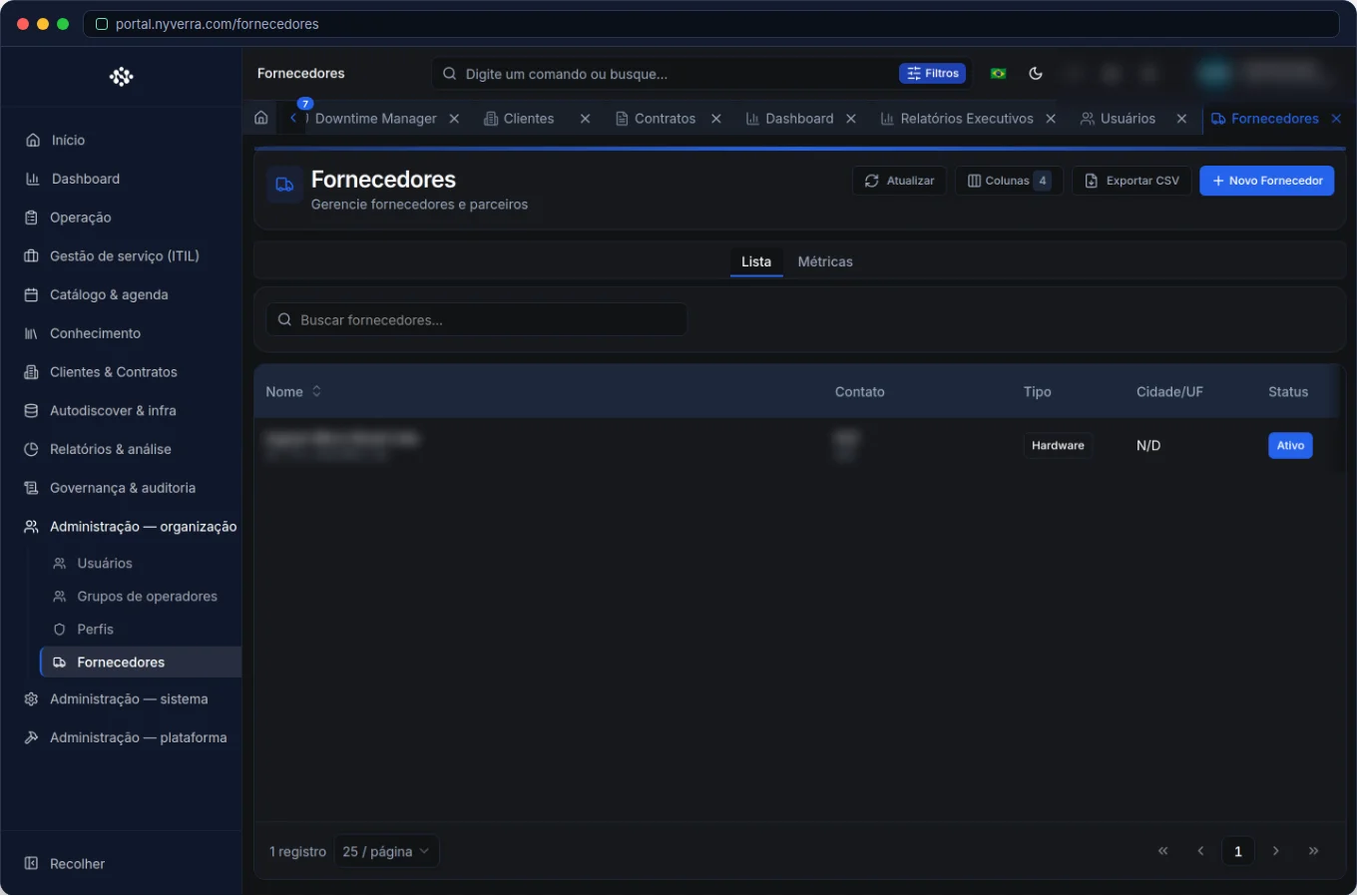 Module interface in Portal Nyverra ITSM.
What the Suppliers module solves
It is the registration of external suppliers with their contact information and their links to the rest of the system:
- Identification: legal name, type of supply (link, hardware, software, service).
- Support channels: phone, email, portal and supplier's contract/ticket number.
- Links: contracts, assets (CMDB) and tickets.
Why link the supplier to the ticket
When an incident depends on a third party, linking it in the ticket brings clarity:
- Traceability: it is recorded who was contacted and with which protocol.
- Communication: the client understands that the delay is outside direct IT control (external dependency).
- Management: accumulates data to charge the supplier and renegotiate contract.
Who uses it
| Profile | Typical use |
|---|---|
| Admin / backoffice | Supplier registration and contact channels |
| Operations | Associate the supplier with the ticket and record the protocol |
| Manager | Monitor dependencies and third-party performance |
How to use: step by step
- Register the supplier with support data and contacts.
- Link assets and contracts related (what it supplies/supports).
- In the ticket, reference the responsible supplier when the cause is external.
- Record the protocol opened at the supplier in the ticket workflow.
- Track deadlines and performance per supplier.
Business rules
| Rule | Explanation |
|---|---|
| Link scope | The supplier links to assets/contracts; visibility follows the client. |
| Sensitive data | Supplier contacts and contracts are business information; restrict access. |
| Third-party SLA | Supplier deadlines are managed as a process; record them in the ticket. |
Best practices
- Keep contact channels updated — in an incident, time is everything.
- Always record the protocol opened at the supplier in the ticket workflow.
- Track performance per supplier to support renewal/penalty.
- Link the supplier to the assets it supports, for impact analysis.
- Standardize registration for reliable dependency reports.
Common mistakes
| Situation | What to do |
|---|---|
| Ticket without supplier record | External dependency traceability is lost; link and record the protocol. |
| Outdated support contact | Revisit data periodically. |
| Not tracking third-party deadlines | Create a collection routine and use data in renegotiation. |
Frequently asked questions
Is supplier the same as client?
No. Client is who receives the service; supplier is who provides/supports IT.
Can I have a supplier ticket inside mine?
Not as a separate ticket — record the external protocol in the workflow and link the supplier.
Does it serve to measure third-party SLA?
It helps: with records in the ticket, you can track deadlines and performance.
Automate via API
Suppliers are exposed via API (/api/fornecedores) and can be linked to tickets at creation. Reference at developer.nyverra.com.
Use cases: when the third party is in the way
1. Unstable internet link. The incident points to the carrier. With the supplier registered, the team contacts the correct contact, records the protocol in the ticket, and tracks the third-party deadline — instead of wasting time figuring out where to open the external ticket.
2. Hardware without replacement. The supplier delays replacing a part. Records in the ticket accumulate evidence of delay — ammunition to renegotiate contract or change supplier.
3. Unmapped dependency. A critical service depends on a third party that no one knew was essential. The supplier ↔ assets link reveals this dependency before it becomes a crisis.
Supplier KPIs
| Indicator | What it reveals |
|---|---|
| Tickets linked per supplier | Real dependency |
| Average response time of third party | External performance |
| Incidents with external cause | Where the failure is |
| Suppliers without linked contract | Risk of informal support |
Third-party management
Treating suppliers with data is what turns complaint into argument. Recording the external protocol, measuring deadlines, and reviewing performance periodically allows charging, renegotiating, and, if necessary, replacing. Integrate the supplier with the CMDB (what it supports) and the ticket (who was contacted) — this way third-party dependency ceases to be invisible.
Supplier checklist
- Register data and support channels.
- Link assets and contracts.
- Record the external protocol in tickets.
- Monitor third-party deadlines.
- Review performance periodically.
- Keep contacts updated.
Additional frequently asked questions
Does the supplier generate automatic tickets?
Not directly; the link in the ticket records the dependency and the protocol.
Does it serve to charge third-party SLA?
It helps: records allow tracking deadlines and support renegotiation.
Can I have multiple contacts per supplier?
Yes; keep the main ones updated for quick contact.
Conclusion
With mapped suppliers, Portal Nyverra ITSM provides visibility into the service's external dependencies. Every incident involving a third party now has traceability, clear communication, and data to charge those who need to be charged.
Leia também: Roles and Permissions in Nyverra Portal: Tailored Access Control · Reports in the Nyverra Portal: Evidence to Decide and Prove.
Keep reading
Read also
 Portal ITSM
Roles and Permissions in Nyverra Portal: Tailored Access Control
RBAC is the foundation of access control. See how the Roles module in Nyverra Portal ITSM defines granular profiles and permissions, protects sensitive functions with 2FA, enables temporary delegation by period, and relies on the principle of least privilege.
5 min de leitura Portal ITSM
Reports in the Nyverra Portal: Evidence to Decide and Prove
Indicators that don't lead to action are just numbers. See how the Nyverra ITSM Portal generates executive reports, client and contract extracts, hours per technician, email scheduling, and history — the evidence that management and compliance demand.
5 min de leitura Portal ITSM
Traceability in Nyverra Portal: The Complete History of Every Ticket
Audit + history in a single timeline. The Traceability module of Nyverra Portal ITSM reconstructs the lifecycle of a ticket — who did what, when, and in what order — for investigation, root cause, and compliance (ISO 20000, LGPD).
5 min de leitura
Comments
No comments yet
Be the first to share your thoughts on this article.
Leave a comment