


User Management in the Nyverra Portal: Right Access, Right Person
 Wedson Lopes
Security starts with knowing who enters. The Users module of the Nyverra ITSM Portal manages the accounts that access the system — customers, technicians, and administrators — with profiles, groups, scope, and security policies.
This guide covers user registration, the access model, secure recovery (2FA reset), and corporate identity integration.
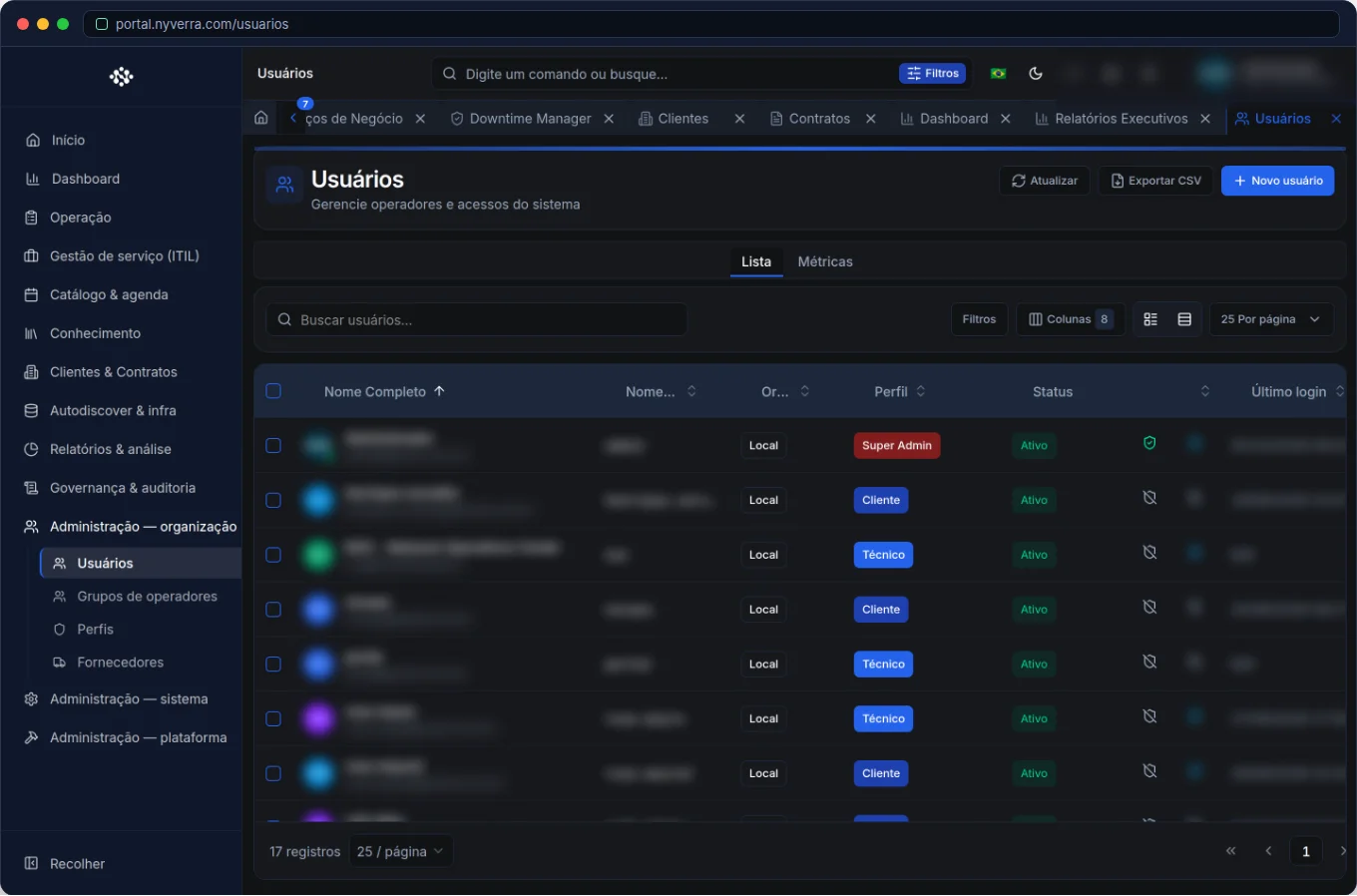 Interface of the module in the Nyverra ITSM Portal.
What the Users module manages
It is the registration and management of accounts that log in. Each user has a base profile (Customer, Technician, Administrator…) that defines, along with permissions, what they can see and do. This is the basis of the portal's RBAC.
Base profiles and per-client scope
| Base profile | Typical scope |
|---|---|
Customer (CUSTOMER) |
Sees only data from their own organization |
| Technician | Serves according to groups and permissions |
Administrator (ADMIN) |
Manages the instance, according to scope |
Super administrator (SUPER_ADMIN) |
Privileged accounts and profile elevation |
In addition to the profile, the user can have per-client scope and belong to operator groups (the service queues). The technician sees "My queue" for the groups they belong to — hence the importance of linking the correct groups.
The module's features
Registration and invitation
User creation with login, email, base profile, and links. Depending on the policy, the user receives an invitation or a defined password — and there is an option to "Require password change on next login" for local accounts. Local admins and super admins always change the password on first access.
Status and blocking
Accounts can be deactivated to prevent login, keeping the ticket history. Deactivating does not erase the past; it only closes the entrance door.
2FA reset
When a user loses the second factor (phone change, for example), the administrator performs a 2FA reset — controlled recovery, without weakening the security policy.
Operator groups
Groups define the queues. A technician in the "N1 Networks" group sees that group's queue and receives transfers to it. Link users to groups so that routing works.
Corporate identity (SSO/LDAP/SAML)
Instead of isolated passwords, the portal integrates with the company's identity (Active Directory via LDAP, SAML, OAuth2). This reduces the number of passwords, centralizes access termination, and improves auditing.
Who uses it
| Profile | Use |
|---|---|
| Administrator | CRUD of users, groups, and roles |
| Super administrator | Privileged accounts and profile elevation |
| User | Edits own profile (user menu → Profile) |
How to use: step by step
- Users → New: provide login, email, and base profile.
- Link scope: customer (for customer users) and groups (for technicians).
- Define password/2FA policy according to authentication configuration.
- Enable "require password change" for local accounts, if desired.
- Manage status and perform 2FA reset when necessary.
- Review access periodically (inactive accounts, excessive permissions).
Business rules
| Rule | Explanation |
|---|---|
| Least privilege | Grant only necessary permissions. |
| Super admin | Only this profile should promote other admins or edit privileged accounts. |
| Customer | Sees own customer data; does not manage global users. |
| Group × queue | Technician only sees "My queue" for the groups they belong to. |
| Deactivate | Prevents login; ticket history remains. |
Good practices
- Apply least privilege from account creation.
- Prefer corporate identity (SSO/LDAP/SAML) over isolated passwords.
- Require 2FA for privileged profiles.
- Review inactive accounts and obsolete permissions regularly.
- Handle user data in accordance with LGPD and restrict exports.
Common mistakes
| Situation | What to do |
|---|---|
| User does not see a menu | Check active module, permission, and profile (e.g., WHATSAPP_INBOX). |
| Technician does not see the expected queue | Confirm which group they belong to. |
| Accounts with too much privilege | Review roles and scopes; apply least privilege. |
| User lost 2FA | Perform 2FA reset in a controlled manner. |
Frequently asked questions
Does deactivating a user erase history?
No — it only prevents login; tickets remain.
Can I integrate with Active Directory?
Yes, via LDAP/SAML in the Integrations area.
Can the admin require password change on first access?
Yes, through the option on the access tab (and it is the default for local administrative accounts).
Automate via API
Users are exposed via API (/api/usuarios, technicians at /api/usuarios/technicians), with status and 2FA reset. Reference at developer.nyverra.com.
Use scenarios: access lifecycle
1. Technician onboarding. The account is created with the base profile, linked to operator groups, and 2FA is set. In minutes, the person serves the correct queues — with the minimum necessary access.
2. Secure offboarding. When an employee leaves, the account is deactivated: login is blocked immediately, but ticket history remains. With SSO/LDAP, termination in the directory already reflects in the portal.
3. 2FA recovery. The user changes phones and loses the second factor. The administrator performs a 2FA reset in a controlled manner — recovery without weakening the security policy.
4. Privilege audit. Periodically, inactive accounts and excessive permissions are reviewed, applying least privilege.
Access management KPIs
| Indicator | What it reveals |
|---|---|
| Accounts inactive for > 90 days | Access hygiene |
| Users with 2FA enabled | Security posture |
| 2FA resets in the period | Support events |
| Accounts with elevated privilege | Access risk |
| Resolution via SSO vs local | Identity consolidation |
Corporate identity
The more the portal relies on SSO/LDAP/SAML, the fewer isolated passwords and the simpler the control of who enters and who leaves. Align with the identity team, require 2FA for privileged profiles, and handle user data in accordance with LGPD. User management ceases to be an administrative task and becomes a security pillar.
User management checklist
- Register with base profile and correct links.
- Apply least privilege.
- Require 2FA for privileged profiles.
- Link technicians to the correct groups.
- Use SSO/LDAP when available.
- Deactivate accounts when people leave.
- Perform 2FA reset in a controlled manner.
Additional frequently asked questions
When deactivating, do I lose the user's history?
No; tickets and records remain.
How does first access work?
Password change can be required; local administrative accounts always change on first login.
Can I manage registration via API?
Yes, the module is exposed via API with status and reset.
Conclusion
With consistent user management, the Nyverra ITSM Portal ensures that each person has exactly the access they need — no more, no less. Profiles, groups, scope, 2FA, and corporate identity support the security and compliance of the service.
Leia também: Roles and Permissions in Nyverra Portal: Tailored Access Control · Traceability in Nyverra Portal: The Complete History of Every Ticket. · API Keys in Nyverra Portal: Machine-to-Machine Integration with Control.
Keep reading
Read also
 Tutoriais
Roles and Permissions in Nyverra Portal: Tailored Access Control
RBAC is the foundation of access control. See how the Roles module in Nyverra Portal ITSM defines granular profiles and permissions, protects sensitive functions with 2FA, enables temporary delegation by period, and relies on the principle of least privilege.
5 min de leitura Tutoriais
Traceability in Nyverra Portal: The Complete History of Every Ticket
Audit + history in a single timeline. The Traceability module of Nyverra Portal ITSM reconstructs the lifecycle of a ticket — who did what, when, and in what order — for investigation, root cause, and compliance (ISO 20000, LGPD).
5 min de leitura Tutoriais
Audit in the Nyverra Portal: Who Did What, When, and Where
In critical environments, trust is not enough — you need proof. The Audit module of Nyverra ITSM Portal keeps track of actions in the system, with filters and export, supporting investigations, ISO 20000, and LGPD.
4 min de leitura
Comments
No comments yet
Be the first to share your thoughts on this article.
Leave a comment