


The Nyverra ITSM Portal mobile app has arrived — and all of ITSM now fits in your pocket
 Wedson Lopes
The service desk doesn't only happen in front of the computer. It happens in the hallway, in the data center, on client visits — and even after hours. With that in mind, Portal Nyverra ITSM took the next step: its mobile app for Android, now available on Google Play.
And there's more: along with the app, we organized the documentation for each module into practical articles — so your team can explore the entire portal, from day-to-day service to governance.
What you can do in the app
- Secure login: password + 2FA and biometrics (fingerprint/face) for quick access.
- Complete tickets: open, list, capture, handle, transfer, escalate, escalate N1→N2→N3, comment (internal note or public response), attach files and log time.
- Approvals on the go: the pending queue and the decision (approve/reject) directly from your phone.
- Dashboard and indicators: KPIs, trends and SLA in the palm of your hand.
- All modules: Problems/KEDB, Changes, Releases, CMDB/Assets, Catalog and Requests, KB, Clients/Contracts, Reports and governance.
- Offline mode: cached reading and a queue of actions resubmitted when the connection returns.
- Push notifications and deep links: one tap takes you straight to the ticket.
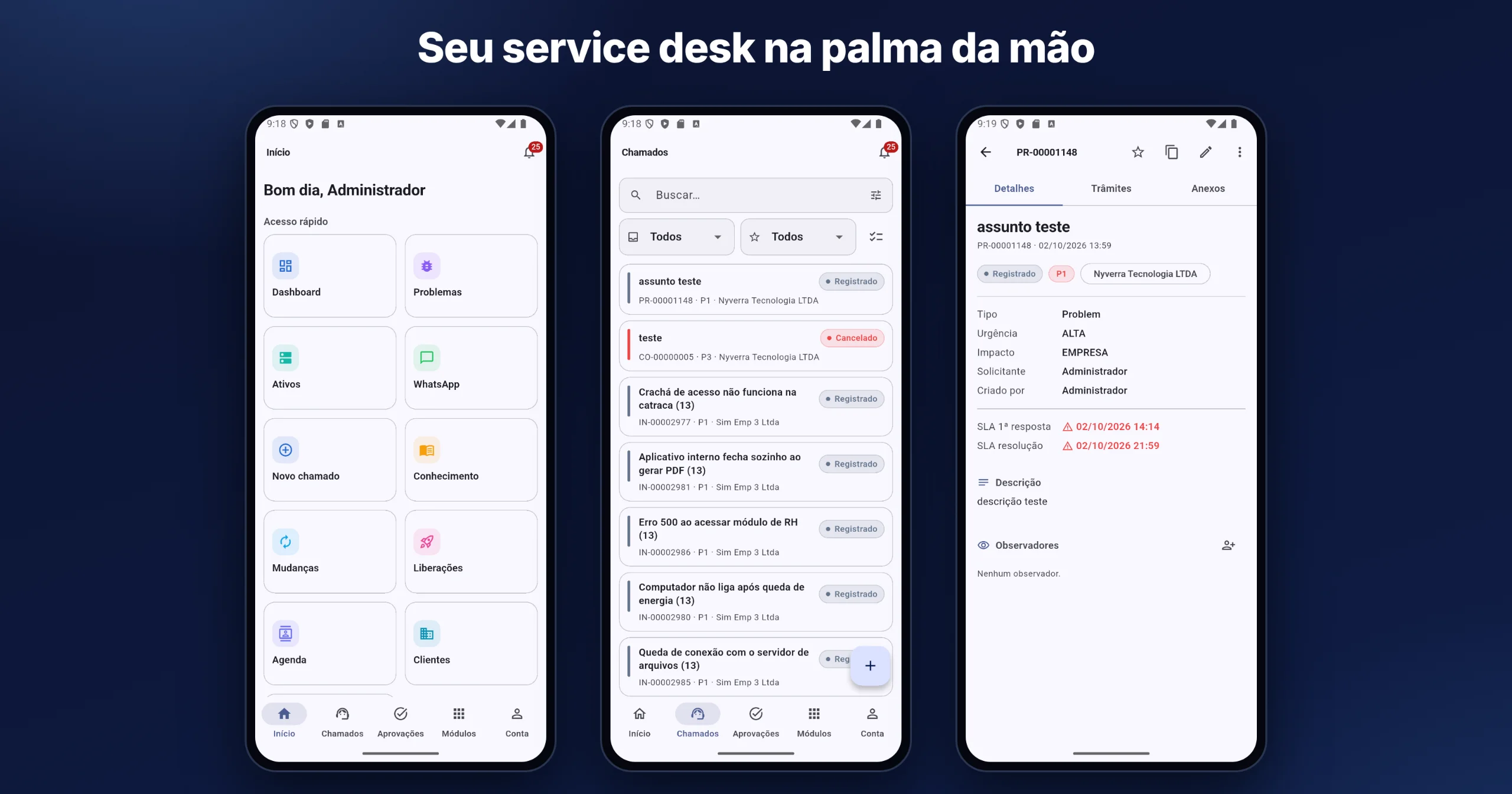
Available on Google Play
Download Portal Cliente ITSM from play.google.com/store/apps/details?id=br.com.portalcliente.itsm.
A complete ITSM — and now documented
The app is the entry point. Behind it, Portal Nyverra delivers end-to-end service management, aligned with ITIL and ISO 20000. And each module now has a dedicated guide, with concepts, flows, best practices and API:
Operations and ITIL
- Tickets — the heart of service delivery, with SLA and workflows.
- Problems & KEDB — root cause, workarounds and known errors.
- Changes — RFC, CAB, risk and rollback.
- Releases — releases with traceability.
- Approvals — governance without stalling service.
Catalog, knowledge and clients
- Service Catalog and Requests.
- Knowledge Base — internal and public.
- Clients and Contracts.
- Contact directory.
Infrastructure, CMDB and analytics
- Assets & CMDB and Business Services.
- Downtime Manager.
- Dashboard and Reports.
Governance and administration
- Traceability, Audit and Feedback.
- Users, Roles and Groups.
- Integrations, Automation and Modules.
Each module has a complete guide. You can find all of them in the Portal ITSM category and in the suggested articles under “Read also”.
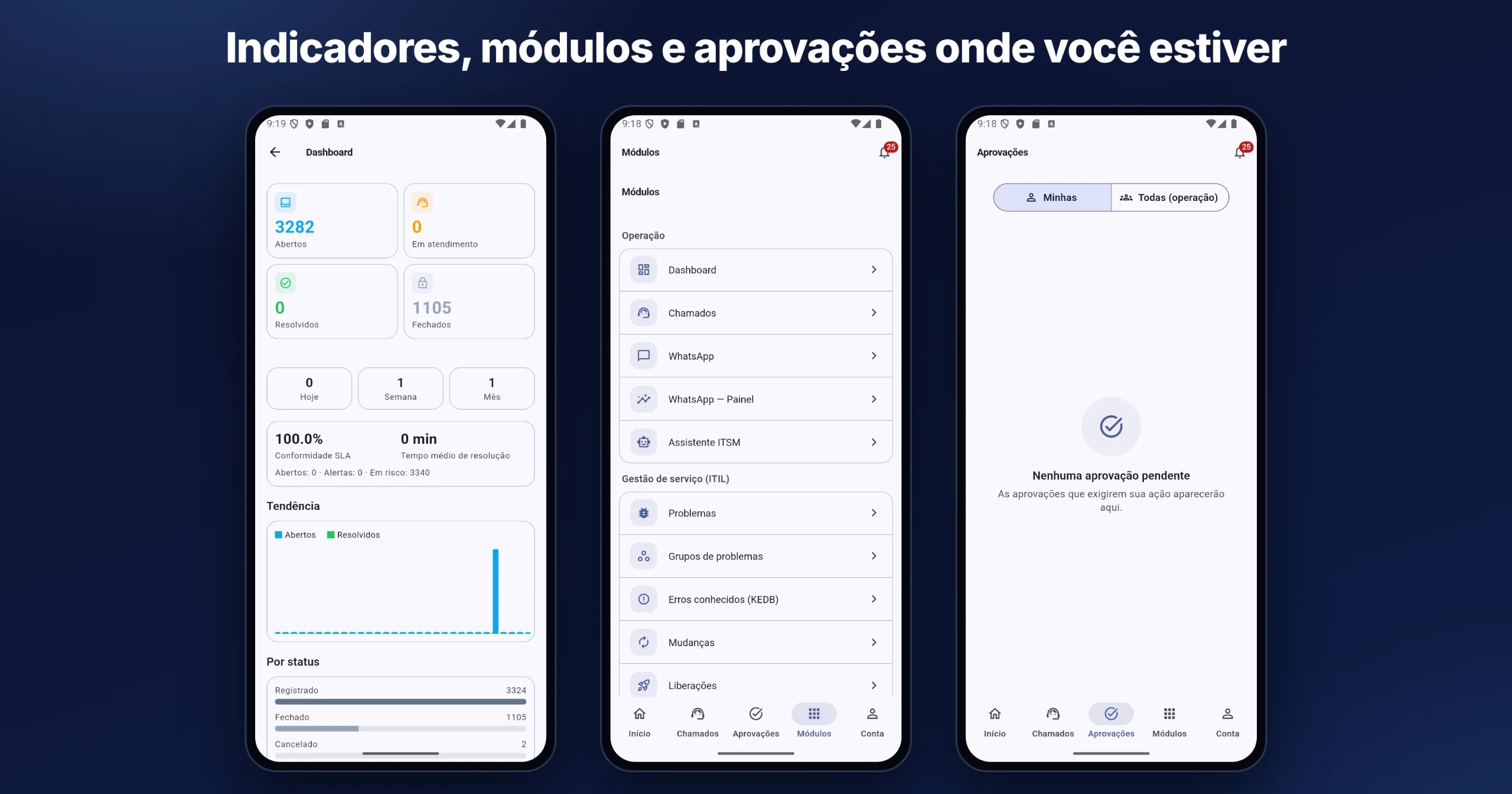
Why this matters for your team
A mature service desk doesn't depend on being in the office. With the mobile app, technicians respond in the field; approvers decide from their phones; managers track SLA from wherever they are. And with documentation per module, adopting the portal becomes faster — each person learns what they need, when they need it.
Where the app changes the daily routine
The value of mobile is not “having an app”. It is removing the need to be at a workstation to make simple decisions. These are the scenarios that appear most often in infrastructure operations:
- Field technician: updates the ticket at the customer site, attaches an equipment photo and logs time without returning to the office.
- Approver: gets the notification, reads the summary and approves or rejects a request between meetings.
- Manager: tracks SLA, queue and trend without opening a laptop.
- On-call: receives the alert, opens the ticket via deep link and escalates to N2 immediately.
Security and continuity
The app uses the same portal authentication, with 2FA and biometrics. Access remains limited by the roles and groups defined in Roles and permissions. In the field, offline mode allows cached reading and queues actions; when connectivity returns, the queue is resubmitted.
For teams working in unstable networks, define a clear policy: what can be done offline, how long data stays cached and how users confirm that an action reached the server.
How to measure adoption
- % of tickets created, updated and closed through the app;
- average approval time before and after mobile;
- first response time in the field;
- offline action success rate after resubmission;
- CSAT by channel and complaints about lack of follow-up.
30-day rollout checklist
- Week 1 — access: validate 2FA, biometrics, groups and permissions for app users.
- Week 2 — flow: test opening, transfer, escalation and approval with a pilot group.
- Week 3 — operation: configure the service catalog, SLAs and push notifications.
- Week 4 — scale: measure adoption, fix friction and expand to remaining groups.
FAQ
Does the app replace the web portal?
No. The app covers daily operations and decisions; the web portal remains the place for configuration, reporting and administration.
Does it work offline?
It supports cached reading and an action queue. Confirmation appears when connectivity returns.
Is it for customers and technicians?
Yes, provided profiles and permissions are configured. Customers only see what they are allowed to see.
Where should we start with the documentation?
Start with Tickets, move to Approvals, connect the CMDB and finish with the Knowledge Base. If you need implementation support, Nyverra offers infrastructure and ITSM services.
Get started now
- Download the app on Google Play and log in with your Portal account.
- Explore the modules through the articles in this library.
- Configure your operation: SLA, catalog, groups and automations.
Ready to take your service desk to the next level? Get to know Portal Nyverra ITSM and talk to us.
Leia também: Business Services in Nyverra Portal: Translating IT into Business · Reports in the Nyverra Portal: Evidence to Decide and Prove.
Keep reading
Read also
 Portal ITSM
Business Services in Nyverra Portal: Translating IT into Business
The business doesn't feel a server go down — it feels email stop. The Business Services (Service Mapping) module of Nyverra ITSM Portal connects services like Email, ERP or PACS to CMDB assets, revealing the real impact of each failure.
5 min de leitura Portal ITSM
Roles and Permissions in Nyverra Portal: Tailored Access Control
RBAC is the foundation of access control. See how the Roles module in Nyverra Portal ITSM defines granular profiles and permissions, protects sensitive functions with 2FA, enables temporary delegation by period, and relies on the principle of least privilege.
5 min de leitura Portal ITSM
Reports in the Nyverra Portal: Evidence to Decide and Prove
Indicators that don't lead to action are just numbers. See how the Nyverra ITSM Portal generates executive reports, client and contract extracts, hours per technician, email scheduling, and history — the evidence that management and compliance demand.
5 min de leitura
Comments
No comments yet
Be the first to share your thoughts on this article.
Leave a comment